
.png)
Most business calendars exist because someone felt like they should. They sit on a "Get Involved" page, get updated twice a year, and quietly become the least visited part of the website.
That's a shame, because a well-run networking events calendar is one of the easiest ways to keep your members and community coming back. Ribbon cuttings, coffee meetups, expos, grand openings. All the moments that build relationships and get people walking your downtown live inside a calendar, if people actually know to look.
Here's how to build one that gets used.
Give People a Reason to Check It Regularly
A calendar only becomes a habit if it's worth the habit. Roswell Inc's business calendar is a good example of this done well. It centers recurring, low-barrier events like Coffee Connect and Evening Connect alongside bigger moments like ribbon cuttings, grand openings, and specialized expos for careers and veteran-owned businesses. The mix matters. Regular touchpoints keep people checking back, and bigger events give them something to plan around.
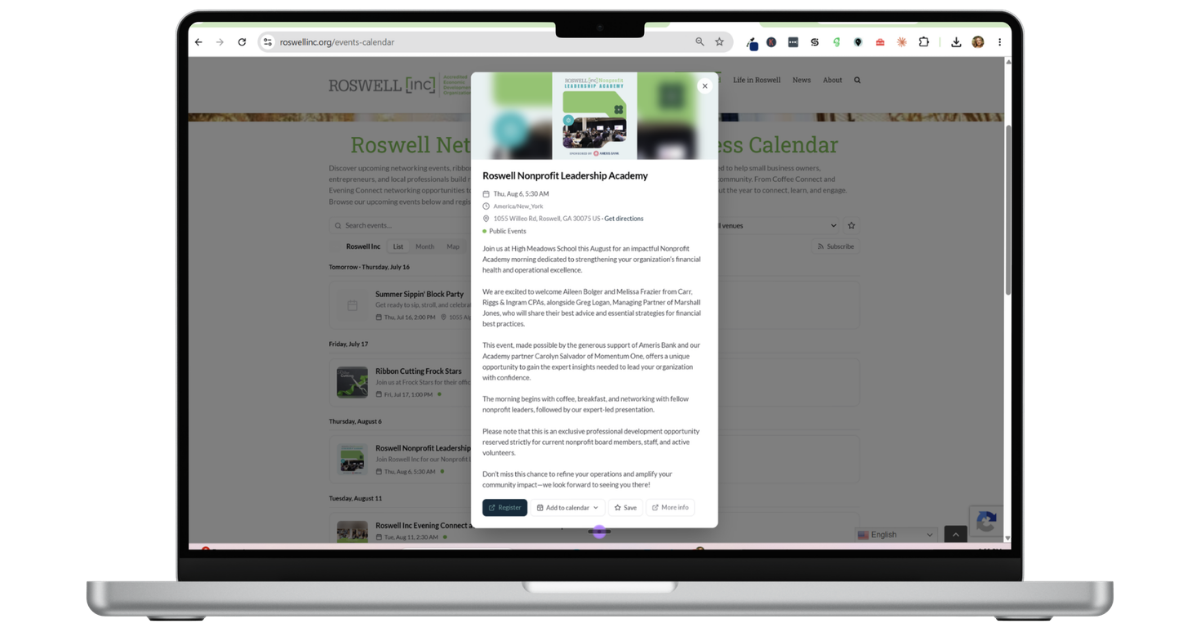
How to Create a Networking Events Calendar in Proxi
Setting one up doesn't take a developer. In your Proxi dashboard, go to Assets > Calendar. From there, add a new event manually, or skip manual entry entirely: paste in a link from Eventbrite, Luma, or Facebook, or paste text straight from an email or flyer, and Proxi pulls the details for you.
For each event, fill in the name, description, and start and end times, and set whether it's a one-time event or recurring (weekly, monthly, or a custom schedule). Add tags like "Family-friendly" or "Outdoor," a cover image, and assign it to a group so it's easy to filter later. The Location tab covers whether it's in-person, virtual, or hybrid, and the People tab lets you list hosts, co-hosts, and speakers. The Registration tab is where you set RSVP requirements or link out to registration, so there's no separate sign-up tool bolted on.
Once you hit Create and Publish, your calendar is live with three ways to browse it: an Agenda view showing the next 90 days, a Venues view organized by location, and a List view with full event details.
To share it, click Share and copy the public calendar or agenda link, or toggle on Embed, pick list or month view, and copy the embed code straight into your website.
Want members to submit their own events? Open the group you want to accept submissions, click the three-dot menu, select Edit Group, and toggle on Accept Public Submissions. That generates a form link you can hand off to members, so events land on your calendar without going through your inbox first.
How to Categorize Networking Events So Members Find What They Care About
Not everyone wants every event. A retail shop owner probably isn't showing up to a Veteran Business Expo, but they'll be at Small Business Saturday planning meetings. As your calendar grows, categories start to matter:
- Networking (coffee meetups, mixers, evening connects)
- Milestones (ribbon cuttings, grand openings, anniversaries)
- Programs (expos, workshops, training sessions)
Even a simple filter saves your members from scrolling past events that aren't relevant to them.
Networking Calendar vs. Community Events Calendar
A networking events calendar is built for your members: coffee meetups, ribbon cuttings, expos, the relationship-building side of running a Chamber or Main Street org. A community events calendar is broader, covering festivals, public events, and anything open to residents and visitors. Most organizations end up needing both, and there's no reason they can't live on the same platform. If you're setting up the broader public-facing version, we've got a separate guide on building a community events calendar.
Common Questions About Networking Events Calendars
How do I get members to submit their own networking events?
Look for a calendar tool that lets you turn on public submissions for a specific group, generating a form link members can use themselves. You stay in control of what's published, but events don't have to route through one staff member's inbox first.
What events actually belong on a networking calendar?
Anything relationship-focused: coffee meetups, mixers, ribbon cuttings, grand openings, and expos. Leave festivals and public community events for a separate calendar or category, so members can find the networking-specific events without digging.
Why This Is Worth the Setup Time
A calendar that people actually check becomes a quiet growth engine. New members find their first networking event. Existing members build relationships that turn into partnerships, sponsorships, and referrals. And your bigger community events get a built-in audience instead of starting from zero every time.
In Proxi, your calendar lives alongside your map and directory, so networking events, ribbon cuttings, and member milestones all show up in the same place your members and visitors already go to find your businesses. Build it once, keep it updated, and let it do the relationship-building work for you.
Adventure Awaits!
Check out some of the latest articles on our blog